Here to help you with your electric car charger.
We’ll talk you through how to set it up, perform your first charge and any troubleshooting you need.

Your EV charger guides.
From getting them up and running, to getting them connected to the internet, you can download the guides for your EV charger below.
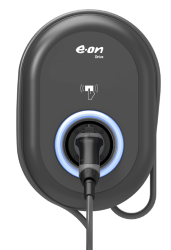
Vestel
Add your Vestel charger to your internet using these guides. To find out which version you have, check the model number printed on the side of your charger. If the model contains “HS” (e.g. EVC04-E7-HSWCTPEN-C), use the HS guide. Otherwise, use the standard guide.
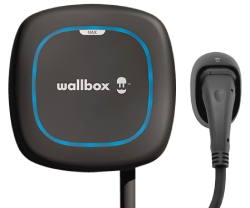
Wallbox
Here you can download a guide on how to connect your charger to your WiFi connection.
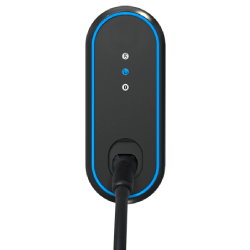
How to solve common EV charger issues.

Getting you back on the road quicker with a simple guide solving EV charger problems.
Getting started with your EV charger.
How do I pay for my EV charger?
You will receive an invoice within 14 days after the installation has taken place. Payment must be made within 30 days of receiving the invoice.
Payment is to be made to EES Ltd directly and can't be deducted from your energy bill.
Can my vehicle affect how my charger works?
Yes, some electric vehicles have specific charging settings that can impact the charging process.
Ensure that your vehicle's charging settings are correctly configured. Check if the vehicle needs to be in park and locked during charging.
Additionally, verify if there are any active schedules on the vehicle that may prevent charging. Some vehicle manufacturers limit the charging power to 80% of the battery capacity. For detailed information, refer to the vehicle handbook or consult the manufacturer.
How do I add an additional user to my charger?
If you have a Vestel charger:
Open your app and select charging authorisation from the menu. You'll be asked if you want to allow only authorised charging - select yes.
At the bottom of the screen you'll see a button "add co-user". Press this button to add another users details.
Enter the email address of the user you'd like to add, then press "invite co-user".
An invitation will be sent out to the user and a message reading "response pending" will be displayed on your charger.
If your recipient has not received an email, then please check the email address provided was correct and follow the steps again.
If you have a Wallbox Charger:To add a user, log in to the myWallbox Portal as a Super-Admin and follow the steps below.
Once logged into the portal click “Users”.
Next you will need to click the “Invite users” button in the top right corner.
Enter the new user’s email and click “Add another user” if you need to add multiple people.
Define the user role and click Continue.
Select the charger assignation method and click Continue.
Assign the charger to your new user and click Continue.
Determine if the user will use free or paid subscription access. Click Continue.
An automatic invitation email is sent to your new user
The new user will need to accept the invitation received by email before they will be linked to the charger.
Can I charge my vehicle directly from solar panels?
No, the EV charger does not support direct charging from solar panels. You will need to connect the charger to the electrical grid.
Why WiFi strength is important, how to check, and how to reconn
Having a good WiFi connection is important, as a weak signal could cause your charger to disconnect. Don’t worry, we’ve got you covered with some handy guides to show you how to check your connection, and how to reconnect, should it go down.
Using your EV charger.
How do I know if my vehicle is charging?
The EV charger light will pulse/blink blue while the vehicle is charging.
The vehicle may display that it is charging.
The E.ON Home or Wallbox app will indicate that the vehicle is charging.
Will my EV charger stop charging when my vehicle is full?
The EV charger will stop charging when the vehicle no longer requires a charge.
The light on the Vestel charger will change from a blue pulse to a solid blue when charging is finished or suspended.
The light on the Wallbox charger will change from a dark blue pulse to a solid turquoise when charging is finished or suspended.
If a vehicle schedule has been set, the charger will only operate within the scheduled times.
Will the EV charger tell me how much charge is in my vehicle?
No, the EV charger does not provide information on the vehicle's battery percentage. This information should be displayed by the vehicle itself.
Why does it take up to 10 minutes for the charging to start?
The 10-minute delay, known as randomised delay mode, is implemented to prevent overloading the electricity grid.
This delay is required by smart charging regulations introduced from 30 June, 2022. Allow extra time for the charging session to begin or use an RFID card to override this delay with a single tap.
What do the lights on my Vestel EV charger mean?
A blue light flashing every 2 seconds indicates that authentication is required to start the charging session. Authenticate the charger using the E.ON Home app or by tapping the RFID card on the charger.
A green flashing light indicates that the EV charger is in randomised delay mode, which helps reduce power surges on the grid. This mode can last up to 10 minutes.
A solid green light means that the charging is waiting for the car to authorise the session. Check your vehicle settings or handbook for any requirements or schedules.
A blue pulse light indicates that the vehicle is currently charging.
A solid blue light means that the charging session has finished or been suspended.
A red light signifies a fault, and your vehicle will not charge when the red light is displayed.
Please see the charging guide at the top of the page.
Does my charger default to off-peak charging?
In line with current regulation your EV charger will default to operate within the following times:
22:00 – 08:00
11:00 – 16:00
When charging outside of the schedule your charger will blink green/blue for 5 minutes to signify awaiting schedule start.
This can be overridden by tapping your RFID card twice with a 15 second gap on the location indicated on the front of your charger.
To confirm, when starting a charge either in or out of a charging schedule:
A randomised delay to the start of the charging will take place and can be for up to 10 minutes.
This is signified by a green blinking light until the charging starts.
This delay can be overridden by a double tap of your RFID card on the location indicated on the front of your charger.
EV charging cables.
What cables do I need for my EV home charger?
Our chargers support type 2 cables. Most electric cars sold in Europe come with a type 2 cable.
If you haven't got one, speak to your vehicle manufacturer.
What is the best charging lead for my charger?
We don't recommend a specific charging lead for the EV charger. It is advisable to consult the manufacturer's guidelines or seek professional advice.
Powering your EV charger.
If I experience a power cut, will the charging session continue?
If you have authorised charging enabled, you will need to reauthorise the charging session after a power interruption.
Does voltage fluctuation affect my charger?
Your EV charger operates within an acceptable voltage range. If the voltage goes beyond this range, the charger will not function and will display a red ring. This safety feature protects the charger and your vehicle from damage caused by high or low voltage.
If this happens you may need to switch the charger off and on at the isolator switch. If you get in touch, we can confirm if the red ring is caused by a voltage fluctuation outside of the thresholds.
Voltage fluctuations often occur during periods of low grid demand, such as the early hours of the morning. If you experience voltage issues, it is recommended to contact your Distribution Network Operator (DNO) to assess and address the problem. Requesting a voltage monitor installation at your property can help record fluctuations for analysis. The DNO is responsible for providing the correct voltage to your property.
In the United Kingdom, the standard voltage for single-phase electricity supply is 230 volts. The allowable voltage tolerance range is typically 216.2 volts to 253 volts. Fluctuations within this range should not cause significant issues for most electrical equipment. However, persistent voltage issues should be addressed by contacting the DNO for assistance.
Why does my EV charge point keep tripping my fuse board?
If your EV charger is tripping your fuse board you'll need to turn off the supply to your EV charger, then call us on 0333 202 4417 and select option 2 for technical support.
Don't use your charger, keep it isolated until we've inspected it.
What is dynamic load balancing?
Dynamic load balancing is an intelligent approach to EV charging. It ensures the highest possible charging power while maintaining a stable electrical grid and power supply.
The EV charger monitors the current usage at your property and adjusts its power output to prevent overload, especially when other high-demand appliances like electric showers, electric cookers, or heaters are being used simultaneously.
Security.
Can anyone use my EV charger?
If your charger is in "authorisation mode", anyone who wants to use your electric vehicle charger will need you to authorise the charging session via your app or RFID card.
You can check your charger is in "authorisation only" mode using your app.
Will my charger still work without an internet connection?
While you can still authorise a charging session without an internet connection using the RFID card or Bluetooth for Wallbox products. However if you have a Vestel charger you will not be able to use the E.ON Home app, as it requires an internet connection.
I've lost my RFID card. What should I do?
You can cancel or replace your lost RFID card through the E.ON Drive app. Please note that an administration fee may apply.
What if I want to delete my account?
If you would like to delete your E.ON Drive account, you can do so in a few easy steps. Simply submit a request through our online typeform.
Troubleshooting.
Why is my vehicle not charging?
Check that the main switch for the EV charger is in the "on" position.
Verify if the vehicle requires charging. Some vehicle manufacturers set the charging parameter to a maximum of 80%.
Ensure that the vehicle has power. If the auxiliary battery is dead, the vehicle will not charge.
Visually inspect the EV charging cable for any damage and replace it if necessary.
Make sure the charging cable is plugged in correctly.
Lock the vehicle to secure the charging lead in place.
Check the charging schedule on the vehicle/app.
Authorise the charging session via the app or RFID cards.
Why didn't my scheduled charge work?
Check that the EV charger is switched on and the charging cable is properly terminated.
If using a vehicle schedule timer, ensure that you have authorised the schedule through the E.ON Home app or Wallbox app for Wallbox products.
Check the schedule timer on the vehicle, as it may need to be active to initiate the charging session.
Ensure that the EV charger is connected to the internet for scheduling to take place.
Refer to the E.ON Home app or Wallbox app FAQs for further support.
Why is my EV charger not charging at full power or taking a long time?
EV chargers start charging slowly and gradually increase to their maximum power output to protect the batteries. After reaching around 80%, the charger will reduce the output power.
Some vehicles have limitations on the amount of power they can accept. Refer to the vehicle handbook for specific information.
Adjust the vehicle parameters if required. Some vehicles have a 3-pin plug home charger mode setting that reduces the incoming power to 3KW when enabled.
The charging speed can be affected by the battery's temperature. Refer to the vehicle handbook for optimal charging temperature.
Battery health and capacity can also impact charging speed. Refer to the vehicle handbook for more information.
The EV charger may reduce its power output if the property's demand is high to prevent the main fuse from blowing.
Hybrid vehicles are only capable of charging at powers up to 3KW. Some models may not reach 3KW charging power. Refer to your vehicle manufacturer manual for more information.
Why is my charger showing as offline?
We've put together a step-by-step guide for connecting your Vestel charger to your Wi-Fi as well as a guide for connecting your Wallbox charger to your Wi-Fi. This works if you've just got the charger or need to reconnect it.
If your charger is still showing as offline:
First check your internet connection to ensure it is working properly.
Close the app or web page associated with the charger, and then reopen it.
If you have recently installed a new router or performed a factory reset, you will need to reconnect the EV charger to your Wi-Fi network using the guide above.
Before installing a home EV charger, you must ensure you have a strong enough Wi-Fi connection to enable communications with the EV charge point. If you do not have Wi-Fi or your signal is not strong enough you may lose the functionality of your home charger. Read our guide on how to check your signal strength.
My RCD test button is not working. What should I do?
If your RCD test button is not functioning, it is important not to use the EV charger until diagnostics have been completed. If your charger is still within the warranty period, contact your installer to arrange for a replacement. For further assistance, please call us on 0333 202 4417.
Apps.
Why is my E.ON Home app not responding?
It may have lost connection with your EV charger.
Close the app and reopen it.
Refer to the E.ON Home app FAQs for further assistance.
Why is my Wallbox Home app not responding?
It may have lost connection with your EV charger.
Check for any software version updates.
Close the app and reopen it.
How to use your home EV charger with the app or RFID card.
If you’ve not used a home charger before or just need a reminder, this will show you how to use your electric car charging point at home.
Ensure that your EV charging station and your vehicle are ready for charging.
Plug in the charging lead into the EV charging station and your vehicle. Please refer to the vehicle’s handbook if you’re having trouble with this.
Start the charging session via the RFID card you got when the charger was installed or the E.ON Home app. You can boost or schedule charging with the app. The blue light will flash every 2 seconds.
The green light will flash for up to 10 minutes during the randomised delay stage. The RFID card can override this stage if used again.
The EV charging station will standby and show a solid green light until the vehicle accepts the charge. If it’s not accepting, check the schedule time of the charge in the app and ensure the EV is in park and locked.
The blue light will pulse when the vehicle is charging.
The blue light will be solid when the electric car is fully charged or the charging session has been suspended.
Use the same method you started the charge with to end it. For example if you started with the RFID card, end it with the RFID card.
Remove the charging cable from your EV. Again refer to your vehicle’s handbook if you’re struggling to do this.
If the light on the home charger is solid red, turn the EV charging station on and off again.
Wallbox charger FAQs.
What type of cable do I need for a Wallbox EV charger?
Your Wallbox charger will come with a Type 2 cable. The “Type 2” socket is the Europe-wide, universal socket for charging electric cars. You can charge most types of car from it.
Are there any grants to help with charger costs?
Yes - The Office for Zero Emission Vehicles (OZEV) is a government team working to support the transition to zero-emission vehicles. They provide a grant of up to £350 (including VAT) towards the cost of buying and installing a home charger. You’re eligible for an EV charger grant if you own or use an electric vehicle, you live in a flat or rent your home and you have your own private off-street parking space.
Do I need to be an E.ON Next customer?
No - anyone can get a charger quote from us. It doesn't matter who supplies your energy, we can still install a charger for you (though why wouldn't you want to be with us?).
How do I get a Wallbox charger installed?
Your installation is included as part of buying a charger from us, so we’ll handle everything. This includes a video survey and installing it where you need to be placed.
What types of EVs can I charge with a Wallbox charger?
Our fast chargers are compatible with most electric vehicles in the UK. When you speak to one of the team they’ll be able to advise you based on your current EV.
Can a Wallbox charger charge a Tesla?
Yes it can.
How much does a Wallbox charger cost?
Our Wallbox Pulsar Max EV chargers start from £1,049, and you can get a £50 discount if you're an E.ON Next customer.
How do I access the solar features?
Go to the Wallbox app and click on the Settings cogwheel (top right corner), tap on Solar Charging (under Energy Features) and switch the toggle button on to the setting you prefer.
I already have a Wallbox charger installed from E.ON Next. Can I access the solar features?
Currently, these features are only available for new installations from 28 April 2025. However, we may explore the possibility of offering an upgrade option in the future. Stay tuned for updates!
I am on the E.ON Next Drive tariff. Are these features compatible?
Yes! You can use the solar features during the day, but you’ll need to toggle them off before your overnight schedule begins to ensure your charging aligns with your tariff.
Does the solar functionality cost extra?
No, all new Wallbox installations from 28 April 2025 will include solar features at no additional cost.
Do I need an EV tariff?
With our Next Drive EV tariff you get a dedicated EV tariff.
Included with this tariff is a free 1 year subscription to Zoom EV benefits and discounts.1
Get the lowdown on finding the best EV charging prices.

If you’re thinking of buying an electric vehicle (EV), or you’ve already made the switch, you’ll want to know the cost of charging it. Check out this explainer video.
What if I have any questions once my charge point is installed?
If you can't find the answer online, give us a call on 0333 202 4417 and we'll be happy to help.
Installation instructions and conformity documents for the Vestel EV charger.
You can download a copy of the EVC04 installation guide.
Conformity documents.
Please find the model number you need from the grid below to view its conformity document.
Want to know more about public chargers?
Planning a long journey in your electric car?
Ready to charge your electric vehicle?
How much does it cost to charge an EV?
Electric cars vs petrol cars.
Still need to get in touch with us?
If you can't find the answer here, you can call one of our friendly team for EV charger support.
Contact us on 0333 202 4417 and select option 2.

The legal bit.
1 As an E.ON Next customer, you could get a one year’s subscription to Zoom EV. By registering you give consent for your details to be shared with Zoom EV and for Zoom EV to contact you regarding this offer. Zoom EV is a third party vendor and will not share your information with other third parties.
* Based on standard installation with run of 0-5m installation cable from charger to electricity meter. Geographical & install restrictions apply – not available outside of the mainland UK or in any of the following areas and UK postcodes: Northern Ireland, HS1–HS9, KW15–KW17, ZE1–ZE3, PO30–PO41, BT, JE, GY. You must live in a property that is suitable for the installation of an EV charger. Installation terms and conditions apply. £30 loyalty discount for E.ON Next existing customer. Full details of T&Cs. E.ON Next reserves the right to cancel or withdraw this price reduction at any time.